
A long term tablet review should answer the question most launch-day coverage skips: will you still enjoy this tablet after the novelty wears off? I spent eight years selling tablets and processing the returns afterward, so I learned to watch what happens after the first week. A bright display and a fast processor sell a device. Battery anxiety, awkward software, weak speakers, and a cracked charging port send it back.
I now test tablets at home in Fort Worth, with a painter's-tape number on every unit and plenty of real-world abuse. My kids get involved, work gets done, and the tablet has to remain pleasant after repeated use. I've seen what comes back, and the patterns are more useful than a spec-sheet race.
What a Real Long Term Tablet Review Tests
The first test is not gaming performance. It is friction. Can you unlock the tablet quickly, find the app you need, adjust the volume without hunting through menus, and charge it with a cable already in your house? A tablet that creates small annoyances several times a day becomes an expensive drawer decoration.
For a long term tablet review, I use a device for at least two weeks whenever possible. I stream YouTube and Netflix, read articles, write notes, make video calls, use Bluetooth headphones, and leave enough storage free for updates. I also restart it, switch between Wi-Fi networks, and test the keyboard or stylus if those accessories are part of the buying pitch.
The return-counter clues are consistent. People often return tablets because they are slower than expected, too cramped for schoolwork, or unable to run an app they assumed would work. A smaller price does not help if the buyer immediately needs a case, keyboard, storage card, and replacement charger.
iPad, Galaxy Tab, or Fire: Where the Money Goes
Apple's entry-level iPad remains the safe choice for someone who wants strong app support, a long usable life, and simple setup. It is not always the cheapest complete package, especially once you add a Pencil, keyboard case, or more storage. However, resale value and broad accessory support can make the higher starting price easier to justify.
Samsung's Galaxy Tab range is more varied. A Galaxy Tab S series model usually offers an excellent display, useful multitasking, and an included S Pen on some models. The less expensive Galaxy Tab A line can handle streaming and basic browsing well, but its limitations show sooner when several apps are open. This is where a long term tablet review matters: smooth scrolling on day one does not guarantee comfortable use a year later.
Amazon Fire tablets are compelling for Prime households, children, and casual reading. Their low prices, often around $60 to $200 depending on size and sales, reduce the pain of a cracked screen. The compromise is Amazon's software environment and more limited access to some mainstream apps. Buy one for a clear purpose, not because a sale label makes every limitation disappear.

Battery Life After the First Month
Manufacturers usually discuss battery life under controlled conditions. Real homes are messier. Brightness gets turned up, a child plays a demanding game, notifications arrive, and the tablet spends hours searching for a weak Wi-Fi signal. A device that lasts eight to ten hours for light video can feel much less impressive during mixed use.
My long term tablet review routine includes a full charge, several hours of streaming, reading with the screen on, and overnight standby. I watch whether the battery drops dramatically when the tablet is idle. I also note charging speed. A tablet that needs most of an afternoon to recover is harder to share between family members.
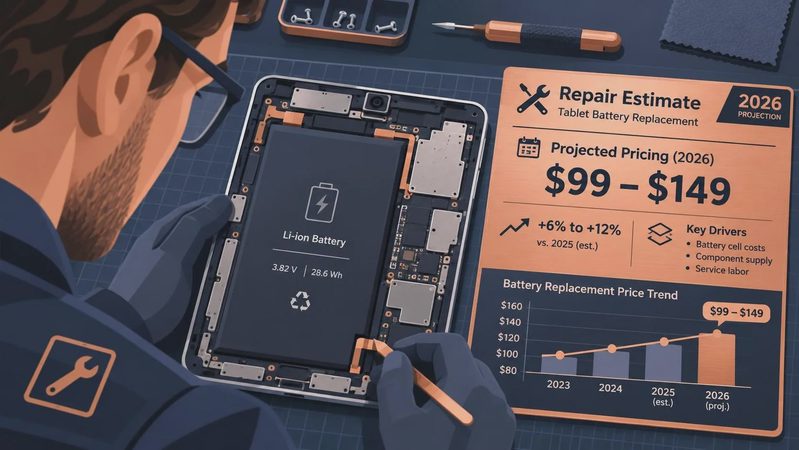
Battery health matters more for older models bought at a discount. A two-year-old premium tablet can still be a better buy than a new budget tablet, but only if its battery has not been heavily worn. Ask about return coverage when buying used or refurbished, and test charging immediately rather than waiting until the return period is nearly over.
The Features People Think They Need
I have watched shoppers spend an extra $200 for a keyboard, then bring the accessory back because the tablet was never comfortable for serious typing. If you write long documents every day, a laptop may be the better tool. A keyboard is useful for email, school assignments, and short work sessions, but it does not automatically turn a tablet into a laptop.
Stylus support is similar. Digital artists and note-takers can benefit from low-latency pen input, palm rejection, and a place to store the pen. For occasional signatures or grocery lists, a basic compatible stylus is often enough. A long term tablet review should separate a feature that improves your routine from one that merely looks impressive in an advertisement.
Storage deserves more attention than camera specifications. Sixty-four gigabytes can disappear quickly after system files, downloaded shows, games, photos, and documents. For a family tablet, 128GB is a more comfortable starting point. Some Android and Fire models support microSD cards, while iPads generally require choosing internal storage at purchase.

The Jonah Test and Family Durability
Every review unit in my house gets the Jonah test: my seven-year-old uses it for a full week under supervision. That means YouTube Kids, reading apps, games, accidental fingerprints, and a case being removed and reattached repeatedly. My four-year-old Ivy contributes the less technical screen-smudge test.
A family tablet needs more than a rugged case. Parents should look for a bright enough display, dependable parental controls, easy profile switching, and speakers that do not become harsh at normal volume. USB-C ports are convenient, but they still need protection from sideways cable pulls. A $25 to $50 case can prevent a repair, but it cannot fix poor software or a screen that is uncomfortable to view.
For older adults, simplicity often beats maximum power. Large text, clear speakers, reliable video calling, and a charger that connects easily matter more than a high refresh rate. Set up accessibility options before gifting the device, then pin the applications the person actually uses.
My Buying Process Before the Return Window Closes
Start by writing down the three tasks the tablet must handle. For one buyer, that might be reading, video calls, and recipes. For another, it could be schoolwork, drawing, and split-screen research. Then choose the operating system that has the required apps instead of choosing based on brand loyalty.
Next, calculate the complete cost. Include a case, charger, keyboard, storage, and any cellular service. A $180 tablet that needs $100 in accessories may not beat a $300 model with better storage and a stronger included charger. Compare the final package, not the large sale number on the shelf.
During the first few days, test every important function. Download your usual apps, make a video call, connect headphones, transfer a file, try the camera, and read in the lighting where you normally use the device. Keep the packaging until you are satisfied. In my long term tablet review experience, the buyers who test early make better decisions than those who wait for a vague feeling of disappointment.
Final Verdict From the Return Counter
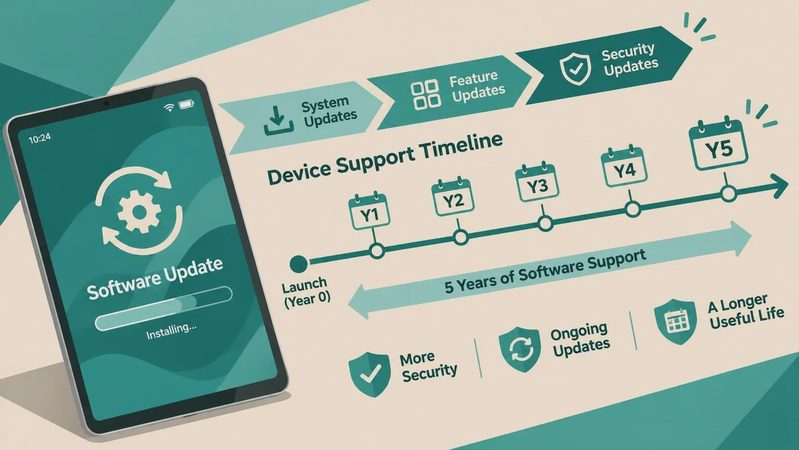
The best tablet is rarely the one with the loudest launch campaign. It is the one that fits your habits, has enough storage, receives useful updates, and does not require constant workarounds. An iPad is usually the dependable general recommendation, Samsung offers the strongest Android range, and Fire tablets make sense when the budget or child-focused use case comes first.
Use this long term tablet review as a reminder to buy for the second month, not just the first afternoon. If the device remains comfortable after real apps, real charging habits, and real family handling, you probably found a keeper. If it already frustrates you during setup, a discount will not change the underlying problem.

No comments yet — be the first to share a thought.