The samsung galaxy tab s9 is the kind of tablet that looks easy to recommend from a store display: bright screen, slim metal body, included S Pen, and enough power to make an iPad owner curious. After years of handling tablet purchases and returns, I look at it differently. The important question is not whether the specifications look impressive. It is whether you still enjoy using it after the novelty wears off.
My short answer is yes, with one important warning: this is a premium Android tablet, not a cheap laptop replacement. It is excellent for reading, streaming, handwritten notes, light illustration, and family use. It is less convincing if you expect desktop-style multitasking or a huge library of tablet-optimized apps.
What the Samsung Galaxy Tab S9 gets right
The first thing you notice is the 11-inch Dynamic AMOLED 2X display. Colors are rich without looking dull, blacks are properly dark, and motion feels smooth at up to 120Hz. Netflix, YouTube, comics, and downloaded movies all look excellent. The screen is also a comfortable size: large enough for split-screen work, but not so wide that carrying it around the house becomes annoying.
The chassis feels expensive in a way that many midrange tablets do not. It is thin, rigid, and rated for water and dust resistance under an IP68 classification. That does not mean I would leave it beside a swimming pool, but a spilled drink or damp kitchen counter is less frightening. The four speakers are another practical win. They get loud enough for a bedroom or kitchen, with clearer dialogue than the bargain tablets that often come back to my old store.
Performance is strong because Samsung paired the tablet with Qualcomm's Snapdragon 8 Gen 2 for Galaxy chip. Apps open quickly, games run well, and switching between Chrome, Samsung Notes, and a video call does not feel sluggish. The samsung galaxy tab s9 also includes an S Pen, which changes the value calculation if you annotate PDFs, sketch, or take handwritten class notes.
Where buyers get surprised
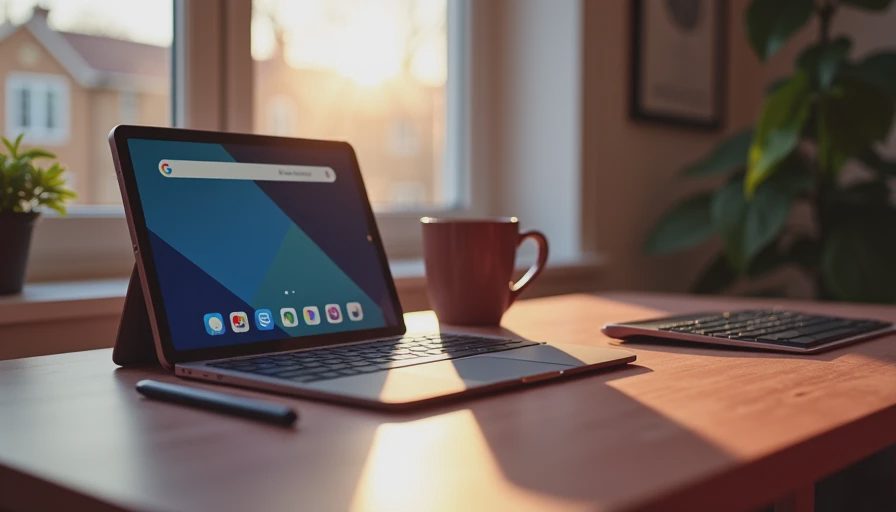
The samsung galaxy tab s9 is not a tiny Windows computer. Samsung's DeX mode makes the interface feel more desktop-like, and a keyboard cover can make email and document editing easier. Still, Android tablet apps can behave awkwardly in wide windows. Some are simply enlarged phone apps, while others do not support the shortcuts or menus you expect from a laptop program.
That distinction explains a lot of returns. A buyer sees a premium tablet, adds a $200-or-more keyboard accessory, and expects to replace a laptop. After two weeks, they discover that long spreadsheets, advanced photo editing, or a stack of browser tabs is more comfortable on a real computer. If your work depends on Microsoft Excel macros, specialized business software, or full Adobe desktop tools, buy a laptop first.
Storage also deserves attention. The base model's storage can feel tight once you add large games, downloaded shows, photos, and offline maps. There is a microSD card slot, which helps, but expandable storage is most useful for media files rather than magically making every app faster. Buyers who expect to store years of high-resolution video internally should price the larger configuration from the start.
Is it good for families and students?
This is where the samsung galaxy tab s9 performs better than many spec-focused reviews suggest. It is fast enough for school platforms, video calls, research, ebooks, and note-taking. The S Pen is included rather than sold separately, so a student can mark up lecture slides without immediately spending another $80 to $130 on an accessory.
For families, Samsung's software tools allow separate user profiles and parental controls, although the setup is not always as simple as an Amazon Fire tablet. My own family test is straightforward: hand the tablet to a seven-year-old for a week and see whether the adult still wants it back. The samsung galaxy tab s9 passed the Jonah test because it survived games, cartoons, drawing, and repeated trips from the couch to the kitchen without feeling fragile.
The screen is fantastic for children, but that also means supervision matters. A protective case with raised edges is a sensible $25-to-$60 purchase. I would not hand over a bare tablet and assume a strong glass front makes it kidproof. Water resistance protects against some accidents; it does not protect against a tablet being dropped onto concrete.

Battery life, cameras, and everyday comfort
Battery performance is solid rather than magical. With mixed use involving streaming, web browsing, notes, and occasional games, it can comfortably cover a long day for many owners. Brightness, cellular use, gaming, and constant video playback reduce that figure. Charging is not especially fast by modern phone standards, so remember to top it up before a flight instead of waiting until the departure announcement.
The rear camera is useful for scanning documents, photographing a whiteboard, or capturing a receipt. It is not a reason to choose this tablet over a phone. The front camera is more important because it handles video calls, and its quality is good enough for school meetings and family chats in decent light. In a dim room, no tablet camera performs miracles.
At roughly a pound before adding a case, the samsung galaxy tab s9 is comfortable for reading in a chair but less pleasant to hold one-handed above your face for an hour. That sounds minor until you spend a week using it in bed. A lightweight stand or folio case improves the experience more than a premium keyboard does for many people.
Samsung Galaxy Tab S9 versus the alternatives
The closest comparison is usually an iPad Air or a larger iPad, not a budget Android model. Apple's tablets still have a stronger selection of polished tablet applications and a longer, clearer software-support reputation. The Samsung option counters with a high-refresh AMOLED display, an included stylus, microSD expansion, and more flexible Android file handling. Your phone also matters: a Galaxy phone creates a smoother Samsung ecosystem, while an iPhone owner may prefer AirDrop and existing Apple accessories.
The Galaxy Tab S9 FE costs less and makes sense for basic streaming, schoolwork, and browsing. Its screen and processor are not in the same class, though. On the other side, the Tab S9+ gives you a larger display for split-screen work, but it is less portable and usually costs more. The samsung galaxy tab s9 is the balanced pick when you want premium performance without carrying a large tablet.
Do not compare only the sale sticker. Add a case, screen protector, keyboard if needed, and storage card. A seemingly reasonable $700 setup can approach laptop money quickly. That does not make it a bad purchase; it just makes the intended job important.
My buying advice after the return window
I would recommend the samsung galaxy tab s9 to someone who wants a premium Android tablet for media, notes, drawing, travel, and everyday family use. I would steer a laptop-first buyer toward a lightweight Windows computer, and I would steer a casual streamer toward a cheaper tablet. Paying for power you never use is not smart shopping.
Look for a sale from Samsung, Best Buy, or a major carrier, but compare the final bundle price rather than the headline discount. Samsung often sells accessories in bundles, and that can change the value substantially. Before ordering, confirm the storage size, Wi-Fi or cellular version, return terms, and whether the included S Pen is in the box.
After eight years in retail, I've processed more tablet returns than most reviewers have published reviews. The samsung galaxy tab s9 does not avoid every compromise, but its common complaints are predictable and preventable: unrealistic laptop expectations, expensive accessories, and choosing too little storage. Know those limits, and this is one of the safest premium Android tablet purchases you can make.



No comments yet — be the first to share a thought.