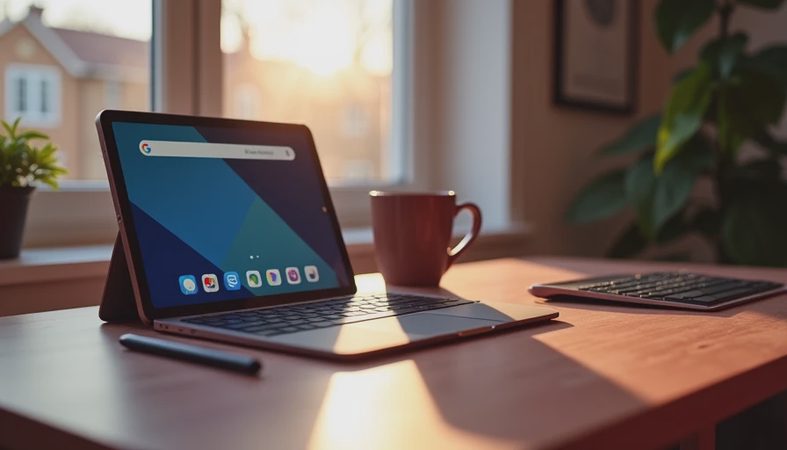
A tablet with keyboard looks like the perfect middle ground: lighter than a laptop, more useful than a phone, and often less expensive than a premium computer. But after eight years selling tablets and processing the returns, I learned that the best tablet with keyboard is not always the one with the fastest processor or the most impressive accessory bundle. It is the one that fits how you actually work.
I have seen people return expensive tablets because the keyboard was cramped, cases kept falling apart, or the software made simple tasks frustrating. I have also watched inexpensive models become reliable kitchen computers, travel screens, and homework stations. I have seen what comes back. Here is how to avoid buying the wrong setup.
Decide what job the tablet must handle
Start with the task, not the brand. If you mainly want email, web browsing, streaming, grocery lists, and occasional documents, nearly any decent tablet with keyboard can handle the basics. A 10- or 11-inch screen is portable, and 4GB of memory can be acceptable for light use if you are not juggling many browser tabs.
Schoolwork needs a little more breathing room. Students switching between Google Docs, research tabs, video calls, and class portals will have a better experience with at least 6GB or 8GB of memory. Storage matters too. A 64GB device can fill quickly after system files, downloaded videos, photos, and apps. For regular school or office use, 128GB is a safer starting point.
Work requirements can change the answer completely. A tablet works well for writing, scheduling, presentations, and remote access, but specialized desktop programs, multiple large spreadsheets, and full Adobe workflows can expose its limits. If your job depends on Windows-only software, a detachable tablet running Windows might make more sense than an iPad or Android model.

The keyboard is not an afterthought
Many shoppers compare processors and screen resolution, then treat the keyboard as a free bonus. That is backwards. With a tablet with keyboard, the accessory often determines whether you use the device every day or leave it in a drawer.
Look for a keyboard with firm keys, a stable hinge, and enough space for your hands. Smaller 8-inch and 9-inch tablets can be convenient, but their keyboards often feel like an extended phone accessory. They are fine for short messages and travel notes, not ideal for writing a ten-page paper.
A detachable keyboard case should hold the screen at a useful angle without tipping backward. The trackpad should register ordinary swipes and clicks without requiring repeated taps. Backlighting is helpful on airplanes or in a dim bedroom, but it should not excuse shallow, mushy keys.
Some keyboards connect through dedicated pins, while others use Bluetooth. Pin-connected models are usually simpler because they draw power from the tablet and do not require separate pairing. Bluetooth keyboards can work across devices, but remember one more battery to charge. Before buying, check whether the keyboard is included, optional, or sold by a different company at a separate price.
iPad, Android, or Windows?
An iPad paired with a keyboard is usually the easiest recommendation for people already using an iPhone, AirPods, or iCloud. Apple offers strong app support, long-running software updates, and a polished interface. The catch is cost. Once you add a keyboard case, a basic iPad setup can move from roughly $350 to $600 or more, depending on storage and accessories. The standard iPad is enough for many readers; the iPad Air makes more sense for heavier multitasking or creative work.
Samsung Galaxy Tab models are attractive for Android users, especially those who like split-screen tools and expandable storage on certain versions. Samsung keyboard covers can be excellent, but the total package can approach laptop pricing. A midrange Galaxy Tab is often the sensible target instead of the most expensive Ultra model, unless you genuinely need its larger display.
Amazon Fire tablets are inexpensive and useful for reading, streaming, simple games, and household tasks. They are less convincing as a primary work computer because the app selection and multitasking experience are more limited. A Fire tablet with a Bluetooth keyboard can be a good $100-to-$200 secondary device, but I would not buy it expecting a full laptop replacement.
Windows models such as the Microsoft Surface line offer familiar desktop software and a more laptop-like experience. They can be ideal for Office users, but the price climbs quickly, and some entry-level models feel slow when loaded with many programs. The cheapest option is not always the value winner.

A practical buying checklist
Before ordering a tablet with keyboard, spend five minutes checking these details:
- Confirm the exact keyboard model and whether it is included in the box.
- Check the tablet's storage after accounting for system software, not just the advertised capacity.
- Look for a screen size of at least 10 inches if you expect to type often.
- Verify that the operating system supports your essential apps.
- Read return terms for bundled accessories, since a keyboard case may have separate packaging or conditions.
- Check charging ports and accessories. A tablet with one USB-C port can become inconvenient if you need to charge while using a wired accessory.
- Test the trackpad immediately. Delayed clicks, skipped gestures, or a loose case are reasons to act during the return window.
A good tablet with keyboard should also survive ordinary handling. Put it in a bag, use it on a couch, and type for 20 minutes before judging it. Store demos hide small annoyances that become unbearable at home.
Who should buy one, and who should buy a laptop?
This format works brilliantly for travelers, college students, parents, retirees, and anyone who values a bright touchscreen. You can remove the keyboard to read in bed, attach it for email, and use a stand for video calls. That flexibility is the main reason people keep a tablet with keyboard after the novelty wears off.
It is less suitable for someone who types all day, manages complex files, uses specialized engineering software, or needs several full-size ports. A $500 laptop with a comfortable keyboard can be a better buy than a $350 tablet plus a $150 keyboard case. The laptop may be heavier, but it usually offers fewer compromises for long work sessions.
For families, durability and simplicity matter more than benchmark scores. My own "Jonah test" is straightforward: can a seven-year-old open the case, find a video, and avoid breaking the stand? If not, the device is probably too fussy for a shared home setup.
My final recommendation
Buy the tablet first as a computer, then judge the keyboard as an essential tool rather than a bonus. For most people, an 11-inch iPad or midrange Samsung Galaxy Tab with 128GB of storage is the safest starting point. Choose a Windows detachable if desktop programs are non-negotiable. Choose an Amazon Fire model only when the low price and basic entertainment use are the main goals.
I would spend less on processor bragging rights and more on a comfortable keyboard case, a reliable stand, and enough storage. That combination is what separates a tablet with keyboard that gets daily use from one that ends up back in the returns bin. Buy from a seller with a clear return policy, test every function during the first week, and do not let a flashy spec sheet talk you into a device that does not match your routine.


No comments yet — be the first to share a thought.